
Pick MintMCP, now called Mintive, if you need an enterprise MCP gateway with SSO groups, SOC 2 Type II and per-user licensing on a custom quote. Pick MCPifex if you want hosted MCP servers, tools chosen per API key, and published plans that start at $0.
Mintive governs the MCP servers, agents and model calls a company already uses. MCPifex runs a set of MCP servers for you behind one endpoint. This page compares the two as of November 19, 2026, using Mintive's public pages and MCPifex's own product.
Is MintMCP the same as Mintive?
Yes. On October 12, 2026, Jiquan Ngiam announced that MintMCP is now Mintive. The new name covers the whole product line: the MCP gateway, an LLM gateway, Mint Guard, Agent Monitoring and Coworker Agents. The announcement says everything customers run today carries over.

The old mintmcp.com addresses now redirect to mintive.com, and the docs use both names. If you searched for MintMCP, you are looking at the same company and the same gateway. The rest of this page says Mintive, because that is the name on the vendor's own pages.
What is the difference between MCPifex and Mintive?
The difference is who the product is built for and how you buy it. Mintive sells to enterprises on a custom quote. Its pricing page lists "per-user licensing based on active AI agent users" and "platform fees" that "scale with usage and team size." The quote form asks for your team size, with options from 1-100 to 10,000+ users. Access is managed through your identity provider, and every tool call lands in an audit trail.
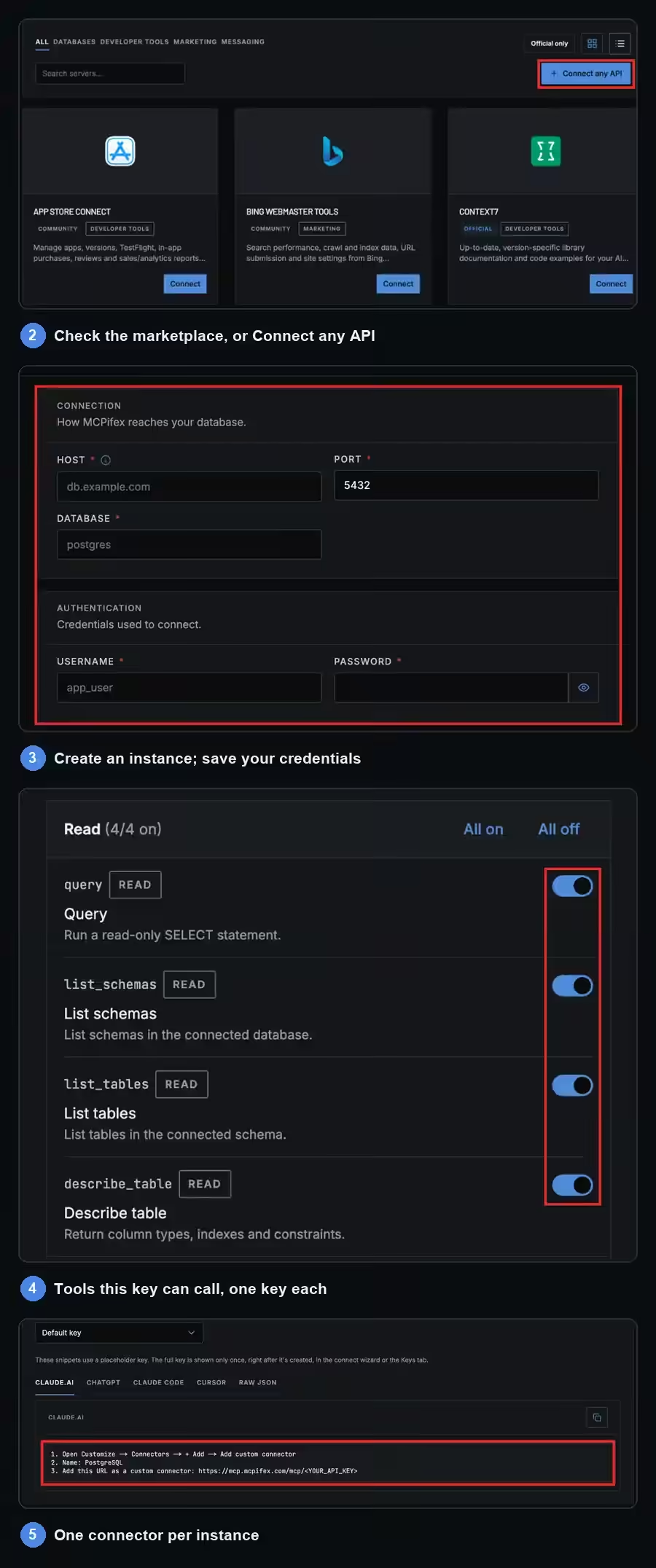
MCPifex is a self-serve service for one person or a small team who want Claude or ChatGPT to reach real data. You:
- pick a server
- save your credentials
- choose the tools for each key
- paste
https://mcp.mcpifex.com/mcpinto your client
Our managed MCP gateway page shows the flow.
| Mintive (formerly MintMCP) | MCPifex | Source | |
|---|---|---|---|
| Who it is built for | Enterprises; the quote form offers team sizes of 1-100, 101-1,000, 1,001-9,999 and 10,000+ users | One person or a team of up to 5 members | Mintive pricing |
| How you buy | Custom quote: per active AI agent user, plus platform fees that scale with usage and team size | Self-serve: Free $0, Pro $19/mo, Team $49/mo | Mintive pricing |
| Where tool access is set | Per Virtual MCP bundle, granted to directory groups; group restriction requires SSO | Per API key, under "Tools this key can call"; deny by default, reads on and writes off | Mintive RBAC docs |
| Sign-in | SSO via SAML 2.0 or OIDC; SCIM 2.0 provisioning (for example Okta and Microsoft Entra ID; Google Workspace is SSO only) | MCPifex portal account; revocable mcpx_ keys | Mintive SSO and SCIM docs |
| Servers | Thousands of connectors in its registry, plus open-source or custom servers in Mintive's managed runtime | Hosted catalog servers, plus any API you connect | Mintive MCP Gateway page, Mintive gateway customization docs |
| Call history and checks | A trail of every tool call, with PII detection and secret scanning | Calls listed on the portal Activity page (profile menu > Profile > Activity) | Mintive MCP Gateway page |
| Audits | SOC 2 Type II audited and compliant with HIPAA standards | No third-party audit claimed; credentials encrypted in transit and masked in the UI | Mintive pricing |
| Where it runs | Managed in the US or the EU, with VPC and self-hosted deployments available on request | MCPifex's hosted gateway | Mintive MCP Gateway page, Mintive pricing |
How does tool access work in each?
Mintive sets tools per Virtual MCP bundle and grants each bundle to SSO directory groups. MCPifex sets tools per API key: a tool not switched on for that key is denied, reads start on and writes start off.

In Mintive, an admin builds a Virtual MCP: a bundle of one or more connectors with chosen tools, published as a single URL. Access policies on each bundle reference groups from your SSO provider, with "Can Use" and "Can Edit" levels. Inside a bundle, tools can be enabled, disabled or redescribed. Mintive's own read-only example disables every mutating tool and keeps get_*, list_* and search_* tools on.
In MCPifex, the rule lives on the API key. One instance, meaning one connection to your database or account, can have several keys. To set a key's tools:
- Open the instance's Keys tab.
- Click Manage.
- Pick tools under "Tools this key can call."
A tool that is not switched on for that key is denied. Reads start on and writes start off.
Say your analyst needs read access to PostgreSQL and your developer needs the execute tool too. In Mintive you would build two bundles and grant each to a directory group. In MCPifex you create two keys on the same PostgreSQL server and switch execute on for one of them. Revoking the developer's key leaves the analyst's key working.
Either way, the connected account sets the real limit. A read tool can still expose a lot if the database role can read a lot, so start with a restricted role.
Can I bring my own MCP server or API?
With Mintive, yes: it runs open-source or custom MCP servers in its managed runtime, or connects remote servers you host. With MCPifex, you bring an API, not a server: Connect any API builds a private MCP server from the API's docs or spec, with API-key auth only.

Mintive takes your own servers in three ways, according to its gateway customization docs:
- "Remote MCP" connects "external servers running in your own infrastructure."
- A "Hosted connector" lets you "deploy open-source or custom MCP servers in Mintive's managed runtime."
- A "Custom server" lets you "bring your own code via the CLI and host it on Mintive."
- The "Pre-vetted catalog" holds servers from Mintive's curated list.
Each of the three routes starts from an MCP server or the code for one.
MCPifex works from the API side instead. Connect any API is a button in the marketplace toolbar. Type the service name or a docs URL and add your API key. MCPifex finds the OpenAPI or Postman spec, or reads the docs, and builds a private MCP server with the endpoints as tools. Before you create the instance, Verify key runs a few read-only calls with your key. If the API has no endpoint that can be tested safely, you must acknowledge that the key cannot be checked. It handles API-key auth only, and how well a scan works depends on the docs.
The ready-made catalog is smaller than Mintive's connector list. MCPifex hosts PostgreSQL, Google Trends, Google Search Console, App Store Connect, WhatsApp (Pro or higher) and Bing Webmaster Tools with 58 tools. Anything else comes through Connect any API.
What does each cost for 1, 5 and 25 people?
MCPifex costs $0 for one person (Free, 3 instances), $49 a month for up to five (Team, 30 instances), and has no plan for 25. Mintive publishes no prices; it licenses per active AI agent user, adds platform fees that scale with usage and team size, and sends a quote. Any Mintive figure below would be a guess. Calls are unlimited on every MCPifex plan.
| How you pay | Mintive (formerly MintMCP) | MCPifex | Difference |
|---|---|---|---|
| 1 person, per month | Custom quote (per active AI agent user, plus platform fees; 1-100 team-size option) | Free: $0, 3 instances, unlimited calls | Ask Mintive for a quote |
| 1 person, 12 months | Custom quote | Free: $0, or Pro at $190 yearly ($228 paid monthly) for 10 instances | Ask Mintive for a quote |
| 5 people, per month | Custom quote (per active AI agent user, plus platform fees; 1-100 team-size option) | Team: $49, 30 instances, up to 5 members | Ask Mintive for a quote |
| 5 people, 12 months | Custom quote | $490 on the yearly plan, or $588 paid monthly | Ask Mintive for a quote |
| 25 people | Custom quote (per active AI agent user, plus platform fees; 1-100 team-size option) | No plan; Team allows up to 5 members | Mintive only |
Mintive figures come from the Mintive pricing page, which asks for your team size and sends a quote. MCPifex figures come from our pricing page. Call volume never changes an MCPifex bill; the instance count is the only limit.
How do I move a workload from Mintive to MCPifex?
There is no import, so you re-enter each connection by hand. Move a connector only if MCPifex hosts it, or if it is an API with public docs or a spec and API-key auth.
- List the Virtual MCP bundles your team uses in Mintive, with the connectors and tools in each.
- Check each connector against the MCPifex marketplace. For any other REST API, use Connect any API with the service name or a docs URL.
- Create a free account and create an instance for each server. Save your own credentials for it.
- Issue one key per person on each instance. A key belongs to one instance, so a bundle with 3 connectors becomes 3 instances, each with its own key. In the instance's Keys tab, click Manage and choose the tools under "Tools this key can call." Leave write tools off until someone needs them.
- Replace the bundle URL in each client with one connector per instance. Each connector uses
https://mcp.mcpifex.com/mcpwith that instance's key, so the 3-connector bundle becomes 3 connectors in the client. - Run one read task per client, then open the Activity page (profile menu > Profile > Activity) to confirm the call arrived.
- Remove the old bundle access in Mintive once every client works.
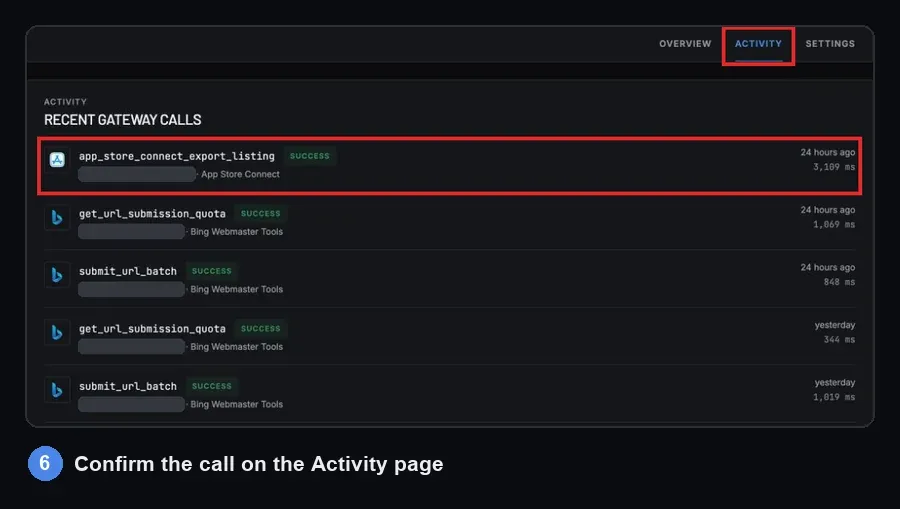
OAuth-only APIs that MCPifex does not host, and servers you packaged for Mintive's runtime, have no MCPifex path today. Keep those where they are.
Where Mintive is the better choice
- You need access tied to your identity provider, with SSO, SAML and SCIM directory sync.
- Your security review asks for SOC 2 Type II, or a vendor that describes itself as "compliant with HIPAA standards."
- More than five people each need their own seat. Mintive's quote form goes up to 10,000+ users.
- You want to deploy your own open-source or custom MCP servers in a managed runtime, or pick from the thousands of connectors in its registry.
- You need data residency options and an uptime SLA.
- You want PII detection and secret scanning on tool calls, plus an LLM gateway and agent monitoring from the same vendor.
Where MCPifex is the better choice
- You want to see the price up front and start free with no card. Free includes 3 instances; Mintive's pricing page is a quote form.
- You want a published, flat price with unlimited calls. A team of five pays $49 a month on Team.
- You want different tools on different keys to the same account, with everything else denied.
- You need an API that has no MCP server, and the service has public docs or a spec.
- You want PostgreSQL, Search Console, App Store Connect or Bing Webmaster Tools run for you, with nothing installed.
What is the verdict?
Mintive is the stronger choice for an enterprise that must govern many agents and MCP servers under its own identity provider and a security review. MCPifex fits one person or a team of up to five who want hosted servers, per-key tools and a price they can see before signing up.
Still comparing? Read the best MCP gateways list or MCPifex vs Docker MCP Gateway. You can start free with 3 instances and no card.
Quick answers
Yes. MintMCP renamed itself Mintive on October 12, 2026. The mintmcp.com addresses redirect to mintive.com, and the announcement says everything customers run today carries over.
Mintive publishes no prices. Its pricing page lists per-user licensing based on active AI agent users, plus platform fees that scale with usage and team size. You give your team size on a form (1-100 to 10,000+ users) and Mintive sends a quote. MCPifex starts at $0, with Pro at $19 a month and Team at $49 a month.
Only for one person or a small team who want hosted servers. MCPifex has no SSO, SCIM or SOC 2 report, and its Team plan covers up to 5 members.
Yes. Mintive sets tools per Virtual MCP bundle and grants bundles to SSO groups. MCPifex sets tools per API key, denies everything else, and starts write tools off.
Sources
- Mintive: MintMCP is now Mintive (announcement, October 12, 2026)
- Mintive: pricing
- Mintive: MCP Gateway product page
- Mintive Docs: role-based access control
- Mintive Docs: SSO and SCIM
- Mintive Docs: gateway customization
Ready to try it?
Run hosted MCP servers behind one endpoint and choose exactly which tools each key can use.
Related reading

Best MCP Gateways Compared: 10 Options for 2026
Ten MCP gateways compared on hosting, auth, tool-level control, logging and price, from Docker and LiteLLM to TrueFoundry, MintMCP and MCPifex.
Read more →
Hosted vs. Self-Hosted MCP Servers: Compare the Costs
Hosted vs self-hosted MCP servers compared: who runs the runtime, security controls, credentials, maintenance and the real cost of operating each.
Read more →
What Is an MCP Gateway? Definition and How It Works
An MCP gateway is one endpoint in front of MCP servers that handles routing, auth, tool policy and logs. Learn how it works and when you need one.
Read more →