OpenAPI to MCP tools come in two kinds. Pick a code generator such as FastMCP, Speakeasy or openapi-mcp-generator if you own the API and want to ship and host the server yourself. Pick MCPifex Connect any API if you want a third-party API in Claude or ChatGPT today, with tools chosen per key and nothing to deploy.
MCPifex is our product, so read this page with that in mind. Every fact about another tool comes from that tool's own docs or announcement, linked in its section and checked on November 19, 2026. Tools in this space change often, so open the linked page before you commit. If you want the step-by-step build instead of a comparison, read the guide on turning an OpenAPI spec into an MCP server.
What does an OpenAPI to MCP tool do?
It reads an OpenAPI document and turns each operation into an MCP tool. An MCP tool needs a name, a description and an input schema in JSON Schema, as the MCP tools specification defines. The operation ID becomes the name, the summary becomes the description, and the parameters become the input schema.
The tools differ on what happens after that mapping. A generator hands you source code. You choose the transport, add auth, deploy it and update it when the API changes. A hosted service runs the server for you and gives you a URL. Five questions separate the options:
- Output: do you get code to run, or a running server?
- Who it is for: the API's owner, or someone who only has a key to the API?
- Tool scope: how do you leave out operations the model should not call?
- Auth: where does the upstream key live, and how do clients authenticate?
- Hosting: stdio on one laptop, or a URL a team and web clients can reach?
How do the OpenAPI to MCP tools compare side by side?
Entries come from each tool's own page as of November 19, 2026. "Not stated" means the page we checked did not say.
| Tool | What you get | Language | License | Choosing tools | Hosting |
|---|---|---|---|---|---|
| FastMCP (from_openapi) | Server built in your Python code | Python | Apache-2.0 | Route maps, EXCLUDE type | You run it |
| Speakeasy | Generated server project | TypeScript | Not stated | x-speakeasy-mcp extension, --scope, --tool, dynamic mode | npm, Cloudflare Worker or MCPB file |
| Stainless | Generated server (existing customers) | TypeScript | Not stated | Not stated on current pages | New signups closed since May 18, 2026 |
| openapi-mcp-generator | Generated Node.js project | TypeScript | MIT | x-mcp extension, tag and operation filters | You run it (stdio, SSE, Streamable HTTP, Workers) |
| MCPifex Connect any API | Hosted private MCP server | No code | Commercial, Free plan | Per API key, reads on, writes off | MCPifex runs it |
FastMCP: OpenAPI import for Python developers
FastMCP builds a server from a spec with one class method, FastMCP.from_openapi(), which takes the spec and an HTTP client. Its OpenAPI integration docs say that by default it converts every endpoint into a tool. Ordered route maps change that, and the EXCLUDE type drops a route. Auth sits on the HTTP client you pass in, for example an Authorization: Bearer header. The FastMCP repository is Apache-2.0 licensed.

The docs are candid about the limits of auto-conversion. They say curated servers usually work better with models than a mirror of the whole API. Treat the import as a starting point, then trim the tool list.
Best for: Python teams who own the API. Trade-off: you write the host, the client auth and the updates. Starting price: free and open source; you pay for hosting.
Speakeasy: generated TypeScript servers with distribution options
Speakeasy generates a TypeScript MCP server from your OpenAPI document with speakeasy quickstart --mcp. Its MCP server build docs list three ways to ship it: an npm package, a Cloudflare Worker, or an MCPB file that Claude Desktop can load. The x-speakeasy-mcp extension renames tools and groups them into scopes. At runtime, --scope and --tool narrow the list, and a dynamic mode exposes only meta tools that list, describe and run the real ones. The docs add that Cloudflare hosting enables OAuth flows.
Best for: API companies that want to publish an official MCP server next to their SDKs. Trade-off: you maintain the spec extensions and the release pipeline. Starting price: generation pricing is not on the pricing page we checked; ask Speakeasy.
Stainless: closed to new users after joining Anthropic
Stainless generated SDKs and MCP servers from OpenAPI specs. On May 18, 2026 it announced that Stainless is joining Anthropic. The post says it is winding down all hosted Stainless products, including the SDK generator, and that new signups, projects and SDKs stopped that day. Customers keep the code they already generated, with full rights to change it. Its old MCP docs URLs now redirect to the home page.
Best for: existing customers who already have generated code. Trade-off: new projects need another tool. Starting price: not available to new users.
openapi-mcp-generator: MIT-licensed CLI
openapi-mcp-generator is a free command line tool. One command, npx openapi-mcp-generator --input ./openapi.json --output ./my-mcp, writes a typed TypeScript Node.js project. Its GitHub README lists four transports: stdio, SSE, Streamable HTTP and Cloudflare Workers. An x-mcp: true or false extension at the root, path or operation level decides which operations become tools. Tag and operation filters on the command line do the same without touching the spec. API keys, Bearer tokens, Basic auth and OAuth2 are read from environment variables.
Best for: developers who want plain generated code with no vendor. Trade-off: hosting, client auth and regeneration are yours. Starting price: free under MIT; you pay for hosting.
MCPifex Connect any API: a hosted server from a spec or docs
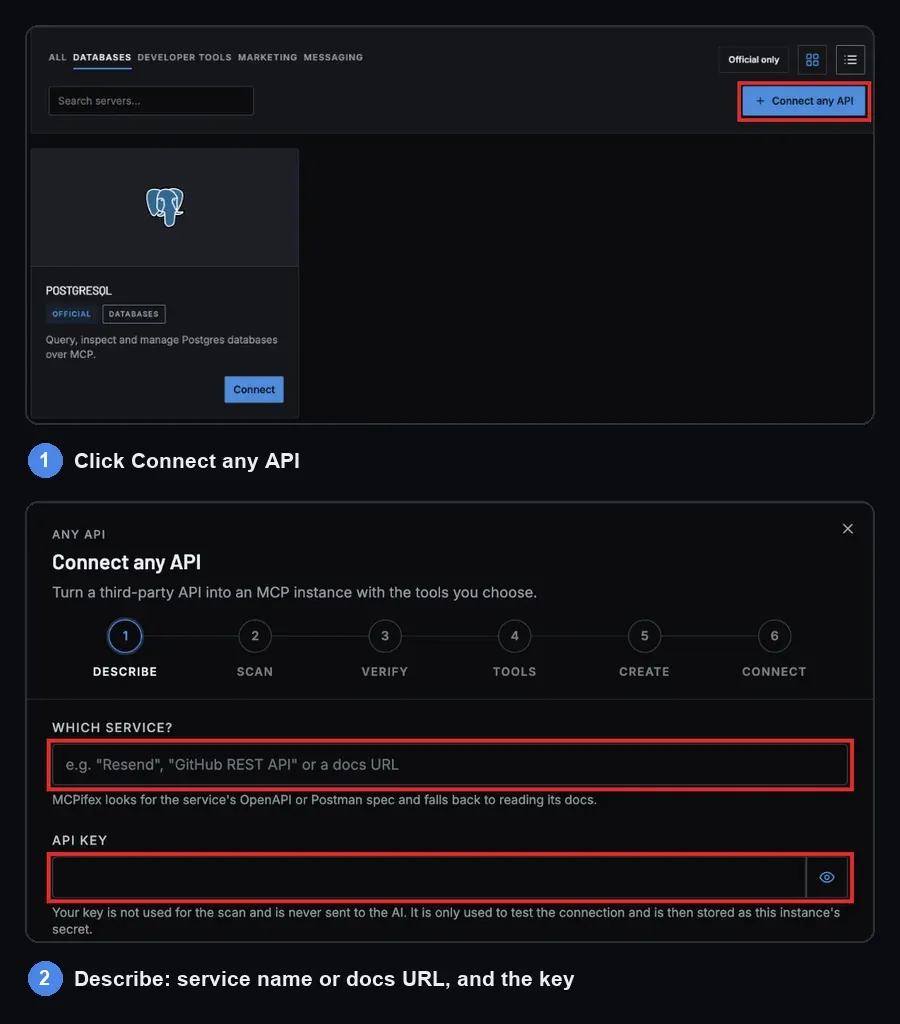
Connect any API is a button in the MCPifex marketplace toolbar. You name a service (for example "Resend") or paste its docs URL, then add your API key. MCPifex looks for an OpenAPI, Swagger or Postman spec and falls back to reading the HTML docs when there is none. The scan finds the base URL and where the key goes: a header, a Bearer token, a query parameter or Basic auth. It also finds extra settings such as a region, and lists every endpoint as a tool marked read or write.
Your key is not used for the scan and is never sent to the AI. Before you can save, MCPifex checks the key with a few read-only calls. The setup screen also shows the host your key will be sent to, so you can check it. Reads start on and writes start off. Saving creates a private instance, and you connect any MCP client to https://mcp.mcpifex.com/mcp with a revocable mcpx_ key.
Tools are set per key in the instance's Keys tab: open Manage and edit Tools this key can call. A tool that is not switched on for that key is denied. One instance can carry a read-only key for an assistant and a key with writes for a developer. Every call shows on the portal's Activity page (profile menu > Profile > Activity). The MCPifex gateway page explains the per-key model in more detail. When the API changes, Rescan API keeps your choices, and new tools arrive switched off.
Honest limits:
- It works only with APIs that take an API key. OAuth-only APIs do not work.
- Scan quality depends on the API's docs, so thin HTML docs can miss endpoints.
- You do not get source code to fork or extend.
Best for: people who use an API they do not own and want it in Claude, ChatGPT, Claude Code or Cursor. Trade-off: no custom tool logic and no OAuth. Starting price: Free, $0, no card.
What does each route cost to run?
The generators are free to use or priced by the vendor, but the code still needs a home. For a remote server that means a host, TLS, client auth, monitoring and a redeploy each time the spec changes. That cost is mostly hours, and it depends on your setup, so we do not put a number on it. Our page on hosted vs. self-hosted MCP servers breaks those hours down.

MCPifex charges per instance. A connected API counts as one instance, and calls are unlimited on every plan.
| Plan | Monthly | Yearly | Instances (one per connected API) |
|---|---|---|---|
| Free | $0, no card | $0 | 3 |
| Pro | $19 | $190 | 10 |
| Team | $49 | $490 | 30 |
Prices are in USD. Team adds a shared workspace for up to 5 members. There is no trial; the Free plan is the trial. Full details are on the MCPifex pricing page.
How do you move a generated server to Connect any API?
If you run a generated server for an API you do not own, the move takes six steps. Nothing is imported from the old server, so you pick the tools again.
- In the MCPifex portal, click Connect MCP on My MCPs to open the marketplace, then click Connect any API in its toolbar.
- On Describe, enter the service name or the URL of its docs, and paste the same API key your generated server used.
- Wait for Scan. Check the host your key will be sent to.
- On Verify, let MCPifex test the key with read-only calls.
- On Tools, switch on the tools your old server exposed. Writes start off, so turn on only the ones you need.
- Create the instance, copy the endpoint and key from Connect, add them to your MCP client, and remove the old server entry.
The Connect any API docs cover each screen, including what to do when the key check fails.
Where is a code generator the better choice?
- You own the API and want to publish an official server. Speakeasy ships npm packages, Workers and MCPB files your users install. MCPifex servers are private to you or your team.
- The API needs OAuth. openapi-mcp-generator reads OAuth2 settings from environment variables, and Speakeasy's Cloudflare option supports OAuth flows. Connect any API takes API keys only.
- You need custom tools. FastMCP lets you add your own Python tools next to the imported ones, for example one tool that chains three calls. A scanned server exposes the API's endpoints as they are.
- The server must run inside your network. Generated code runs where you deploy it. MCPifex runs servers on its own infrastructure.
- You want the code. FastMCP and openapi-mcp-generator are open source, so you can read, fork and audit every line.
Which OpenAPI to MCP tool should you pick?
- Python team, own API, want to curate tools in code: FastMCP.
- API vendor shipping an official MCP server to customers: Speakeasy.
- Free generated code with no vendor: openapi-mcp-generator.
- Existing Stainless customer: keep your generated code and plan a move for new work.
- A third-party API in Claude or ChatGPT today, with tools per key: MCPifex Connect any API. Create a free account, no card.
Whichever you choose, test it the same way:
- List the tools and read the descriptions.
- Call a safe read.
- Call a tool that should be blocked and confirm it is refused.
Quick answers
It depends on who runs the server. FastMCP suits Python teams, Speakeasy suits API vendors publishing an official server, and openapi-mcp-generator is a free MIT CLI. If you want a hosted server without code, MCPifex Connect any API scans the spec and runs it for you.
Yes. FastMCP.from_openapi() builds a server from a spec and an HTTP client. By default every endpoint becomes a tool, and route maps let you exclude or reshape routes.
Not for new users. Stainless announced on May 18, 2026 that it is joining Anthropic and winding down its hosted products, with new signups and projects closed. Existing customers keep the code they generated.
Yes. MCPifex Connect any API takes a service name or docs URL plus your API key, scans the spec or docs, and hosts a private MCP server. It works with API-key APIs, not OAuth-only ones.
Code generators need one. MCPifex Connect any API prefers an OpenAPI, Swagger or Postman spec and falls back to reading the API's HTML docs when none is published.
Connect your API
Turn an API you already use into a private MCP server, with tools chosen per key. Free plan, no card.
Related reading
OpenAPI to MCP: Turn Any REST API into an MCP Server
Two ways to go from an OpenAPI or Swagger spec to working MCP tools: generate and host the code yourself, or scan the API and pick tools per key.
Read more →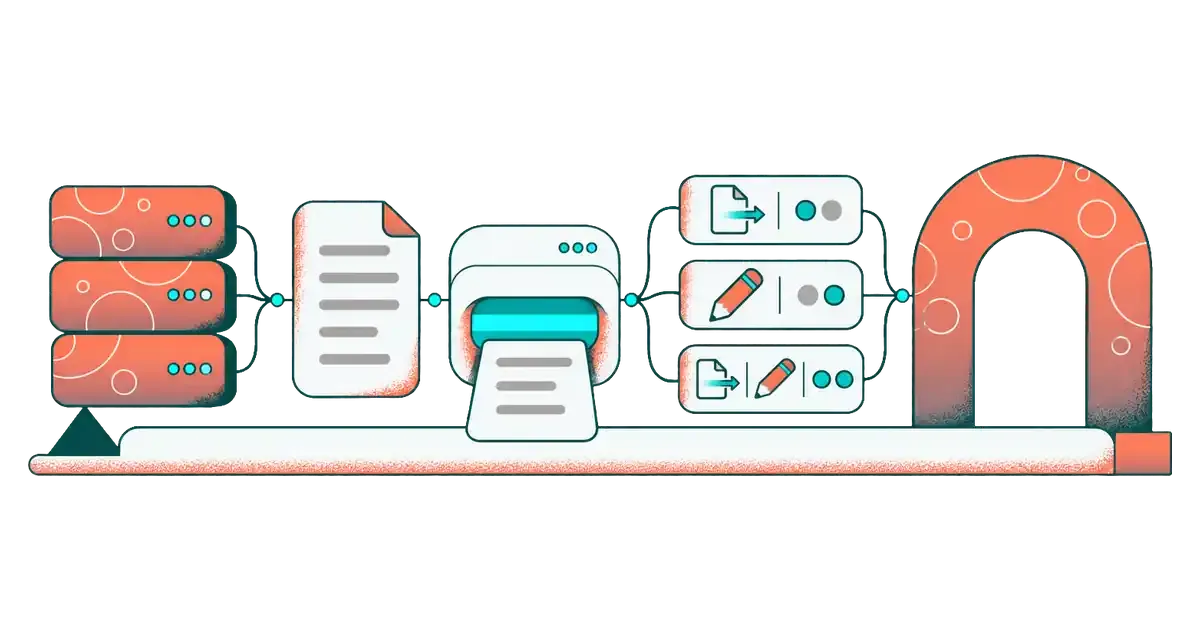
Connect Any API: Scan, Verify, Choose Tools, Rescan
Scan a third-party API from its docs, verify your key with read-only calls, pick tools for your first key, rescan later, and fix scan or key errors.
Read more →
MCP vs API: Key Differences and When to Use Each
MCP vs API: an API is how your code calls a service; MCP lets AI apps discover and call it as tools. See the differences and when to use which.
Read more →