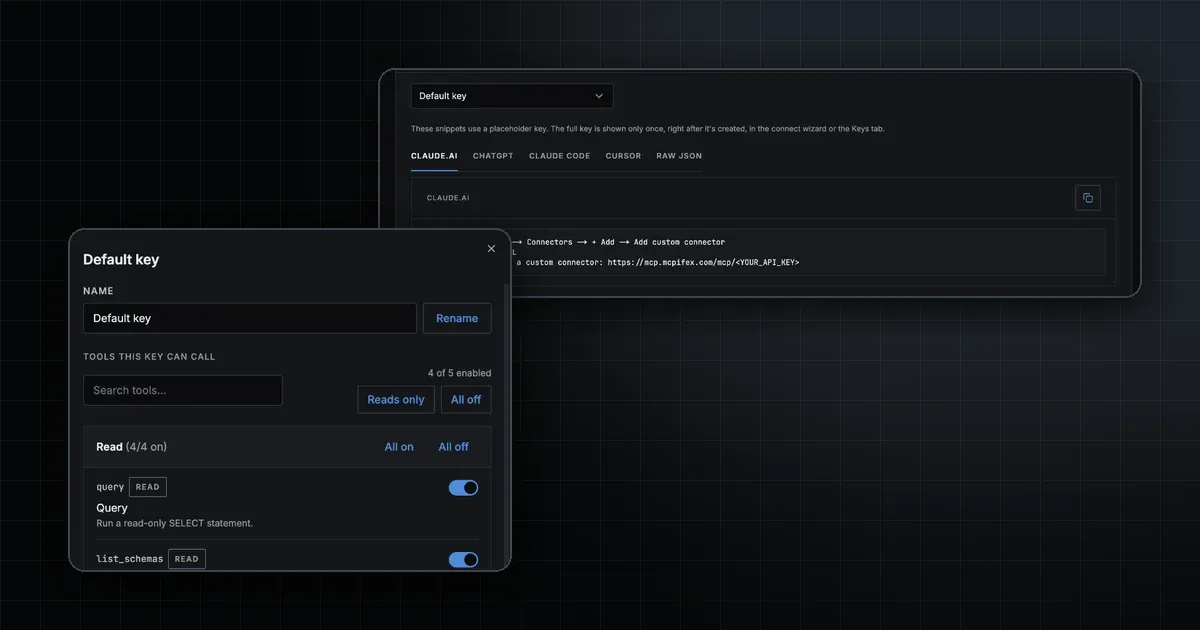
An MCP connector is the saved entry inside an AI app that points it at a remote MCP server. You give the app the server's URL and a way to sign in, and the server's tools show up in your chats. Claude calls this a custom connector. ChatGPT calls it a custom MCP server, saved as a plugin. The connector holds no tools of its own. It is the address plus credentials that the app uses to reach the server.
What is an MCP connector, exactly?
The Model Context Protocol names three roles. The host is the AI app you use. Inside it, an MCP client keeps one session open with each server. The MCP server exposes the tools, such as "run a query" or "list my sites". The spec's architecture page describes it this way and says servers can be local processes or remote services.
"Connector" is not one of those spec terms. It is the product word Claude, ChatGPT and other apps use for the setting you fill in. When you add a connector, you tell the app's client which server to open a session with and how to prove who you are. Most connectors point at a remote MCP server, because web apps cannot start a program on your laptop.
How is a connector different from a server, client or plugin?
The words overlap in marketing copy, so here is how they split in practice.
TermWhat it isWho sets it upExample
MCP server
The program that exposes tools and runs them
Whoever operates the server
A PostgreSQL server with a query tool
MCP client
Protocol code inside the AI app, one session per server
The AI app vendor
The client built into Claude or Codex
MCP connector
A saved name, server URL and sign-in method
You, in the app's settings
A custom connector called "MCPifex" in Claude
Integration or plugin
A packaged bundle that can include a connector plus instructions or UI
A publisher, or you
A ChatGPT plugin created from a custom MCP server
MCP gateway
One endpoint in front of several servers, with auth and tool policy
A gateway operator
One URL that reaches all your hosted servers
A short way to keep them apart: the server does the work, the client speaks the protocol, and the connector is the bookmark that joins them. A gateway lets one connector reach many servers.
How do connectors work in Claude?
Anthropic's help center says custom connectors using remote MCP work on Free, Pro, Max, Ultra, Team and Enterprise plans, and Free accounts get one custom connector. On a personal plan, you open Customize > Connectors, select Add, then Add custom connector. You enter a name and the server URL, click Continue, and choose how to sign in.
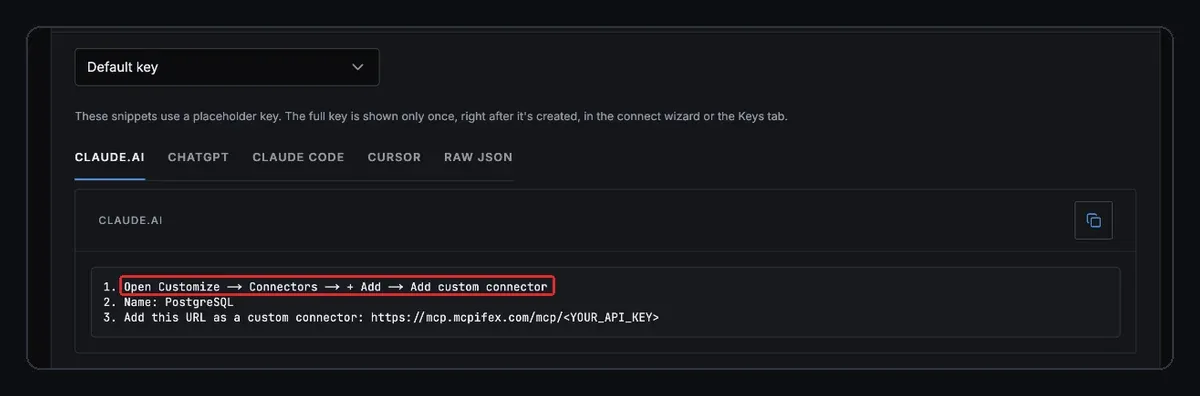
The dialog offers three choices: Sign in now, Sign in when needed, and No sign-in. For a server that uses an API key, Anthropic's docs say to choose No sign-in and add the key under Request headers. On Team and Enterprise, an Owner adds the connector under Organization settings > Connectors, and each member then connects with their own account.
One detail trips people up. Claude connects to the server from Anthropic's cloud, even in Claude Desktop. The server must be reachable on the public internet on port 443, so a server behind a VPN fails even when it works from your machine. The full walkthrough is in our guide to add a custom connector in Claude. For ideas on what to connect, see the best Claude connectors.
How do connectors work in ChatGPT?
OpenAI has renamed this feature more than once. Older menus said connectors and developer mode. The current OpenAI page is titled "Add custom MCP server", and the old developer-mode docs address now redirects to it. In ChatGPT on the web you open Plugins, select the plus button, then Add custom MCP server. You enter a name, paste the server URL under Connection, set authentication, accept the risk warning and select Create as a plugin.
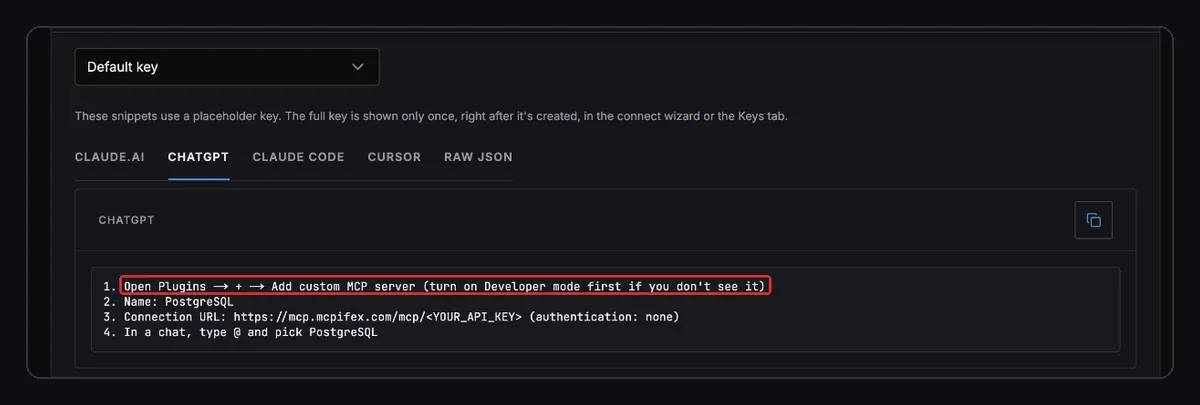
Authentication options are OAuth, No authentication, or a mixed mode. OpenAI lists SSE and streaming HTTP as supported transports. After you install the plugin, you type @ in the prompt box to pick it. Write actions need your confirmation by default. ChatGPT treats any tool without the readOnlyHint annotation as a write. Step-by-step screens are in our ChatGPT MCP connector guide.
Where else does the word "connector" show up?
- The Claude API. Anthropic's Messages API has a beta feature called the MCP connector. You pass remote MCP servers in the request, and the API connects to them without an MCP client of your own. You can allowlist or denylist individual tools.
- Coding agents. Codex, Claude Code, Cursor and Gemini CLI call the same thing an "MCP server" entry in a config file. The idea is identical: a name, a URL or command, and credentials. Our guide shows how to add an MCP server to Codex.
- Automation and enterprise tools. Many platforms used "connector" for their own integrations long before MCP. Check that a product's connector actually speaks MCP before you assume it works in Claude or ChatGPT.
How do you add an MCP connector?
The steps are the same in every app that supports remote servers:
- Get the server URL. It is an HTTPS address, often ending in
/mcp. For MCPifex it ishttps://mcp.mcpifex.com/mcp. - Pick the sign-in method. OAuth sends you to a login page. An API key is a fixed secret, sent in an
Authorization: Bearerheader. - Add the connector. Paste the URL and credentials into the app's connector settings.
- Turn it on in a chat. Claude uses the plus menu in the conversation. ChatGPT uses
@. - Test with a harmless read. Ask for something small, like a list of tables, and expand the tool call to see the real result.
Some web connectors cannot send a custom header. For those, MCPifex also accepts the key as the first path segment: https://mcp.mcpifex.com/mcp/mcpx_.... Treat that URL like a password. The per-app setup steps are on connect your AI.
Is an MCP connector safe to use?
A connector gives the model whatever reach the credential behind it has. If the key can delete rows, the model can try to delete rows. Four habits keep that in check:
- Limit tools per credential. Allow only the tools a job needs. Reads first, writes when you need them.
- Watch shared credentials. Anthropic notes that a team connector using a shared API key gives everyone who uses it that key's access.
- Trust the server. OpenAI warns that an untrusted server can steal information from the chat or push the model into unintended actions.
- Keep revocation simple. Use keys you can revoke one at a time, so one leaked connector does not force you to rotate everything.
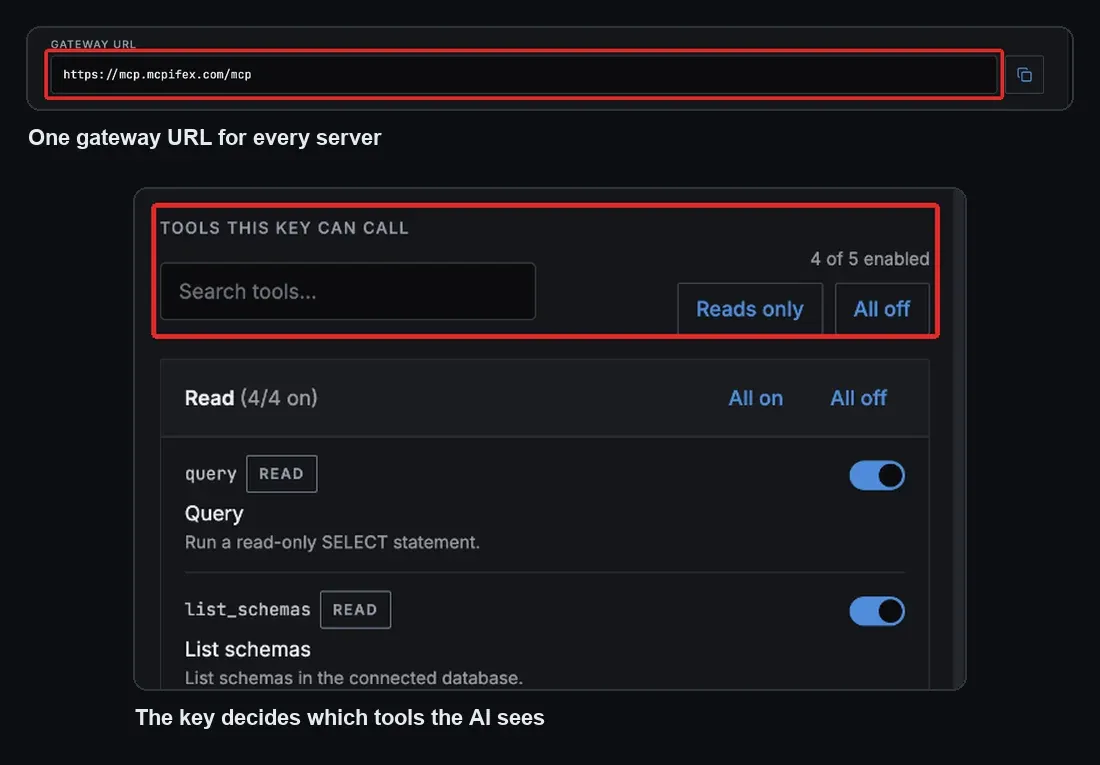
On MCPifex, tools are set per API key and denied by default. A new key starts with the server's reads on and writes off. The gateway filters the tool list to that key's tools and refuses any other call. A change reaches live connectors within about a minute.
What sits behind an MCPifex connector?
MCPifex is the server side of the connector. You add one connector with the gateway URL and an mcpx_ key, and the key decides which hosted servers and tools the AI can reach. The servers include PostgreSQL, Google Search Console, and Bing Webmaster Tools MCP, which has 60 tools with its 34 read tools on and its write and destructive tools off. Bing Webmaster Tools works on the Free plan.
If the service you need has no MCP server, you can turn any API into a connector. You name the service or paste its docs URL, add your API key, and MCPifex scans the docs into tools marked read or write. A test call must pass before you can save. The result is a private instance behind the same gateway URL. The Free plan includes 3 instances and needs no card.
A common pattern: one key with read tools only for a Claude connector, and a second key with more tools for a developer's coding agent. Same instance, different keys, different tools.
Quick answers
No. The server exposes and runs the tools. The connector is the saved entry in your AI app, with the server's URL and sign-in method, that tells the app's MCP client where to connect.
No. In Claude or ChatGPT you paste the server URL, pick a sign-in method and save. Code is only needed if you build the server yourself.
Claude connects from Anthropic's cloud, not your device. The server must be on the public internet on port 443. A server behind a VPN or a firewall fails even if it works from your machine.
Yes. In Claude, choose No sign-in and add the key under Request headers. If the app cannot send headers, some servers, including MCPifex, accept the key in the URL path instead.
Anthropic limits Free accounts to one custom connector. Paid plans can add more, and on Team and Enterprise an Owner adds connectors for the organization.
Sources
- Get started with custom connectors using remote MCP, Claude Help Center
- Add a connector that isn't in the directory, Claude docs
- Add custom MCP server, OpenAI docs
- MCP connector, Claude Platform docs
- Architecture, Model Context Protocol specification (2025-06-18)
Ready to try it?
Run hosted MCP servers behind one endpoint and choose exactly which tools your AI can use.